Quiet Hours: Using a Music Download Site Without Waking the House
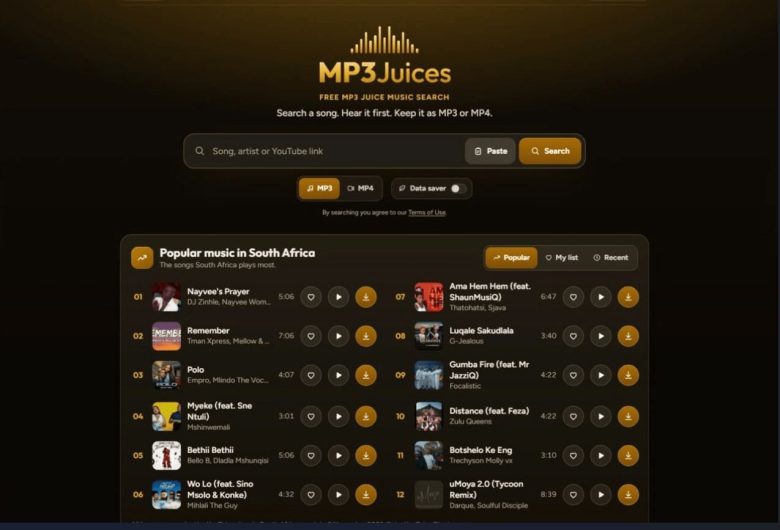
The room is dark except for one lamp, the headphones are on, and the search bar is waiting. That is the scene this article is built around: using a free music download site late at night, when every click feels louder than it should. If you are here because you want to know what mp3juices.art is and how to use it without disturbing anyone, the short answer is that it is a web-based music search and download platform where you can preview songs first and then save them as MP3 or MP4 files, with no account and no installation.
Quiet hours change how you use a tool. You are not browsing casually; you are making small, deliberate choices. The goal is simple: find the track, listen softly, pick the right format for headphones, and keep a tidy list so tomorrow you remember what you saved.
Late Evening: Settling In Without Noise
The first hour after the house goes quiet is not the time for experimentation. You want a predictable path from search to preview to download. MP3Juices keeps that path short: type an artist or song title, look at the results, and press play before you commit to anything. Previewing first is the quiet-hour habit that saves you from downloading the wrong version of a song you only half remember.
Volume discipline matters more than most people admit. Headphones at a low level let you hear whether a result is the studio track, a live recording, or a cover by someone else. If the preview sounds off, close it and try another result. This is also where the site’s data saver mode helps: it reduces how much you pull down while you are only sampling, which is useful if you are on a metered connection or a weak late-night signal.
Choosing Headphone-Friendly Formats
MP3 is the practical default for headphones and phones. It is small, it plays everywhere, and at a decent bitrate it sounds fine on earbuds. MP4 is the better pick when the result includes video, such as a music video or a live performance you want to keep. Pick the format for the device you will actually use, not the one that sounds most impressive. A large video file on a phone with little storage is a quiet-hour annoyance you can avoid in advance.
One small caution: not every search result is the same quality. Some uploads are louder, some are quieter, and some carry background noise. Preview with the volume low, then raise it slightly only after you are sure the file is clean.
Midnight: Searching, Browsing, and Keeping a Tidy List
By midnight, most people stop searching by name and start wandering. That is where the browsing features earn their place. You can move through genres, look up artists, or check the charts when you do not have a specific song in mind. Browsing by genre is quieter than typing guesses into a search bar, because you are following a structure instead of chasing half-remembered titles.
The personal list feature is the quiet-hour equivalent of a notepad by the bed. When a song catches your attention, add it to the list instead of downloading it immediately. A short list you review in the morning beats a folder full of files you cannot identify. It also keeps your late-night session from turning into a long download queue that slows everything down.
Small Choices That Keep the Session Calm
- Search one artist at a time rather than opening many tabs.
- Preview at low volume before deciding to download.
- Use the personal list to park interesting finds for later.
- Download only the format you need: MP3 for audio, MP4 for video.
- Name or sort your files soon after saving so tomorrow’s you can find them.
None of these steps is dramatic. Together they turn a scattered browsing session into something closer to a routine, which is exactly what late-night use needs.
Wind-Down: Equipment Notes and Final Downloads
As the night gets later, your equipment matters more than your intentions. Closed-back headphones leak less sound, which matters in a shared flat or a house with thin walls. Wired earbuds avoid the low-battery warning that can suddenly break the silence. If you are on a laptop, keep the brightness low and the keyboard quiet; the screen is not the loud part, but the habit of clicking fast is.
This is also the point to finish your downloads rather than start new ones. Let the files complete, check that each one plays, and then close the tabs. Ending the session with finished files is calmer than leaving a queue running overnight. If you are still curious about how the site is organized, a quick look at mp3juices.art will show the search, genre, artist, and chart sections in one place, so you can plan tomorrow’s listening without clicking around at random.
A Short Equipment Note
You do not need expensive gear for quiet-hour listening. A pair of closed headphones, a phone or laptop with enough free space, and a stable connection cover most of it. What matters is knowing your limits: storage space, data allowance, and how much sound your walls can absorb.
Quiet-Hour Habits Worth Keeping
The habits that make late-night use work are the same ones that make the site easy to use at any hour. Preview before you download. Choose MP3 or MP4 based on where the file will live. Use the personal list as a holding area instead of downloading everything at once. Browse by genre when you do not know what you want. Keep the volume low and the tabs few.
There is also a practical side worth stating plainly: downloading music does not replace buying it or supporting the artists you love, and the rules differ by country. Treat the site as a search and preview tool, and let your own judgment guide what you keep. Done that way, a late-night session stays simple: one lamp, headphones on, a short list of songs, and a house that stays asleep.